
In my last experiment, I tested ChatGPT o3-mini-high and DeepSeek r1 by challenging them to generate a firework animation in Python. The results were impressive — ChatGPT o3-mini-high delivered a functional and visually appealing simulation in record time, while DeepSeek r1 struggled with execution speed and accuracy. If you haven’t read that post yet, I highly recommend checking it out.
For this round, I wanted to see how well these AI models could generate a classic Snake game using Python. The Snake game is a great benchmark for AI-generated code as it requires smooth movement, collision detection, and proper game logic. Let’s dive into the results!
What is the Classic Snake Game?
If you ever played an old-school Nokia phone game, you probably remember Snake. The concept is simple: you control a snake that moves around the screen, eating food to grow longer. The challenge? Avoid crashing into walls or yourself. As the snake grows, the game gets progressively harder, making it a great test for coding logic and structure. Given its simplicity yet structured mechanics, it’s an excellent challenge for AI-generated game development.
Testing Approach
I used the exact same prompt for both AI models: “Create a Snake game using Python.”
I evaluated their responses based on execution time, code efficiency, bug presence, and user experience.
The Results
ChatGPT o3-mini-high’s Response
Generated the Snake game using Pygame in just 8 seconds.


import pygame
import sys
import random
import time

# Initialize Pygame
pygame.init()

# Game settings
WINDOW_WIDTH = 600
WINDOW_HEIGHT = 400
CELL_SIZE = 20

# Make sure the window dimensions are multiples of the cell size
assert WINDOW_WIDTH % CELL_SIZE == 0, "Window width must be a multiple of cell size."
assert WINDOW_HEIGHT % CELL_SIZE == 0, "Window height must be a multiple of cell size."
CELL_WIDTH = WINDOW_WIDTH // CELL_SIZE
CELL_HEIGHT = WINDOW_HEIGHT // CELL_SIZE

# Set up the display
window = pygame.display.set_mode((WINDOW_WIDTH, WINDOW_HEIGHT))
pygame.display.set_caption("Snake Game")

# Set up the clock for a decent framerate
fps_clock = pygame.time.Clock()
FPS = 10  # Adjust this to make the snake move faster or slower

# Define colors (R, G, B)
BLACK = (0, 0, 0)
WHITE = (255, 255, 255)
RED   = (255, 0, 0)
GREEN = (0, 255, 0)

def get_random_location():
    """Return a random location on the grid."""
    x = random.randint(0, CELL_WIDTH - 1) * CELL_SIZE
    y = random.randint(0, CELL_HEIGHT - 1) * CELL_SIZE
    return [x, y]

def game_over(score):
    """Display Game Over screen and exit."""
    font = pygame.font.SysFont('arial', 36)
    text_surface = font.render(f'Game Over! Score: {score}', True, WHITE)
    text_rect = text_surface.get_rect()
    text_rect.center = (WINDOW_WIDTH // 2, WINDOW_HEIGHT // 2)
    window.blit(text_surface, text_rect)
    pygame.display.flip()
    time.sleep(2)
    pygame.quit()
    sys.exit()

def main():
    # Initial snake: a list of [x, y] positions (head is the first element)
    snake = [[100, 100], [80, 100], [60, 100]]
    direction = "RIGHT"
    change_to = direction

    # Place the first apple
    apple = get_random_location()
    score = 0

    while True:
        # Event handling
        for event in pygame.event.get():
            if event.type == pygame.QUIT:
                pygame.quit()
                sys.exit()
            # Check for key presses
            elif event.type == pygame.KEYDOWN:
                if event.key == pygame.K_UP and direction != "DOWN":
                    change_to = "UP"
                elif event.key == pygame.K_DOWN and direction != "UP":
                    change_to = "DOWN"
                elif event.key == pygame.K_LEFT and direction != "RIGHT":
                    change_to = "LEFT"
                elif event.key == pygame.K_RIGHT and direction != "LEFT":
                    change_to = "RIGHT"

        # Update the snake direction
        direction = change_to

        # Calculate new head position based on the direction
        head = snake[0].copy()
        if direction == "UP":
            head[1] -= CELL_SIZE
        elif direction == "DOWN":
            head[1] += CELL_SIZE
        elif direction == "LEFT":
            head[0] -= CELL_SIZE
        elif direction == "RIGHT":
            head[0] += CELL_SIZE

        # Insert new head into the snake's body
        snake.insert(0, head)

        # Check if snake has eaten the apple
        if head == apple:
            score += 1
            apple = get_random_location()
        else:
            # Remove the tail segment if no apple is eaten
            snake.pop()

        # Check for collisions with the boundaries
        if (head[0] < 0 or head[0] >= WINDOW_WIDTH or
            head[1] < 0 or head[1] >= WINDOW_HEIGHT):
            game_over(score)

        # Check for collisions with itself
        if head in snake[1:]:
            game_over(score)

        # Draw everything
        window.fill(BLACK)  # Clear the screen with black

        # Draw the apple
        pygame.draw.rect(window, RED, pygame.Rect(apple[0], apple[1], CELL_SIZE, CELL_SIZE))

        # Draw the snake segments
        for segment in snake:
            pygame.draw.rect(window, GREEN, pygame.Rect(segment[0], segment[1], CELL_SIZE, CELL_SIZE))

        # Update the display
        pygame.display.flip()

        # Control the game speed
        fps_clock.tick(FPS)

if __name__ == "__main__":
    main()
DeepSeek r1’s Response

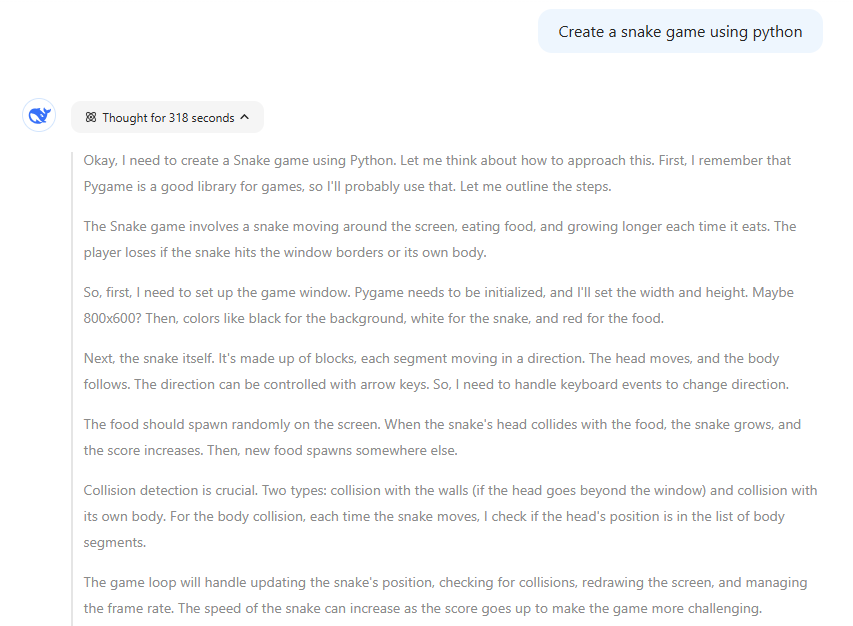
Also used Pygame, but took 318 seconds to generate the code, significantly slower than ChatGPT.
import pygame
import random

# Initialize Pygame
pygame.init()

# Set up the game window
window_width = 800
window_height = 600
screen = pygame.display.set_mode((window_width, window_height))
pygame.display.set_caption('Snake Game')

# Game settings
clock = pygame.time.Clock()
block_size = 20
game_speed = 15

# Colors
black = (0, 0, 0)
white = (255, 255, 255)
red = (255, 0, 0)
green = (0, 255, 0)

# Initialize snake
snake = [(window_width//2, window_height//2)]
snake_direction = 'RIGHT'
score = 0

# Generate initial food position
def generate_food():
    while True:
        x = random.randint(0, (window_width - block_size) // block_size) * block_size
        y = random.randint(0, (window_height - block_size) // block_size) * block_size
        if (x, y) not in snake:
            return (x, y)

food = generate_food()

# Font for score display
font = pygame.font.SysFont(None, 55)

# Main game loop
running = True
while running:
    for event in pygame.event.get():
        if event.type == pygame.QUIT:
            running = False
        elif event.type == pygame.KEYDOWN:
            if event.key == pygame.K_UP and snake_direction != 'DOWN':
                snake_direction = 'UP'
            elif event.key == pygame.K_DOWN and snake_direction != 'UP':
                snake_direction = 'DOWN'
            elif event.key == pygame.K_LEFT and snake_direction != 'RIGHT':
                snake_direction = 'LEFT'
            elif event.key == pygame.K_RIGHT and snake_direction != 'LEFT':
                snake_direction = 'RIGHT'

    # Move the snake
    head_x, head_y = snake[0]
    if snake_direction == 'UP':
        new_head = (head_x, head_y - block_size)
    elif snake_direction == 'DOWN':
        new_head = (head_x, head_y + block_size)
    elif snake_direction == 'LEFT':
        new_head = (head_x - block_size, head_y)
    elif snake_direction == 'RIGHT':
        new_head = (head_x + block_size, head_y)

    # Check for collisions
    if (new_head[0] < 0 or new_head[0] >= window_width or
        new_head[1] < 0 or new_head[1] >= window_height or
        new_head in snake):
        # Game Over
        screen.fill(black)
        game_over_text = font.render(f'Game Over! Score: {score}', True, red)
        screen.blit(game_over_text, (window_width//2 - 180, window_height//2 - 20))
        pygame.display.update()
        pygame.time.wait(2000)
        running = False
        continue

    snake.insert(0, new_head)

    # Check if food is eaten
    if new_head == food:
        score += 1
        food = generate_food()
    else:
        snake.pop()

    # Draw everything
    screen.fill(black)
    for segment in snake:
        pygame.draw.rect(screen, white, (segment[0], segment[1], block_size, block_size))
    pygame.draw.rect(screen, red, (food[0], food[1], block_size, block_size))

    # Display score
    score_text = font.render(f'Score: {score}', True, green)
    screen.blit(score_text, (10, 10))

    pygame.display.update()
    clock.tick(game_speed)

pygame.quit()I’ve uploaded all AI-generated source code to my GitHub repository for those interested in further analysis.
Comparing the AI-Generated Games
ChatGPT o3-mini-high
- Minor Bug: The
get_random_location()function picks a random grid cell for the apple without checking if it overlaps with the snake. This can result in an apple appearing inside the snake or directly in front of it, making it an easy target and possibly confusing the player. - Code Structure: The entire game logic is crammed into a single
main()function. While functional, this “monolithic” approach makes it harder to maintain and scale. Breaking it down into Snake and Apple classes would improve readability and future expandability. - User Experience:
- The game starts immediately upon execution, leaving the player no time to prepare.
- The
game_over()function instantly quits after displaying “Game Over,” without giving the player a chance to restart. - The score is only displayed at the end of the game rather than during gameplay, which could impact engagement.
DeepSeek r1
- Major Bug: The collision check runs before removing the snake’s tail. This can cause the game to falsely detect a self-collision, abruptly ending the game when it shouldn’t.
- Code Structure: Like ChatGPT o3-mini-high, DeepSeek r1 follows a monolithic design, making the code harder to debug and modify. Moving to an object-oriented approach would improve maintainability.
- User Experience:
- Like ChatGPT’s version, the game starts immediately upon running, offering no preparation time.
- The
game_over()function instantly quits instead of allowing the player to restart. - The score is constantly displayed on the board, but it overlaps with the snake and apple, leading to a cluttered interface.
Which AI Did a Better Job?
Between the two, ChatGPT o3-mini-high clearly outperformed DeepSeek r1. The code ran smoothly, generated in just 8 seconds, and was overall more stable. While both had structural issues, DeepSeek’s version contained a critical collision detection bug, making gameplay unpredictable and sometimes unplayable. The user experience flaws were present in both models, but ChatGPT’s version had fewer major issues.
Conclusion
This test further confirms what I found in my previous AI coding challenge: ChatGPT o3-mini-high consistently produces better code than DeepSeek r1. While both models successfully created a working Snake game, ChatGPT was faster, more reliable, and easier to debug.
That said, neither model produced a fully polished, ready-to-use game. Both relied on a monolithic structure rather than a more maintainable OOP approach, and their user experience features needed refinement. These findings highlight a crucial takeaway—AI-generated code still requires human intervention to reach professional quality.
If you’re using AI tools to help with coding, I recommend running extensive tests, refining the logic, and making necessary improvements before deploying AI-generated solutions.